Introduction
When working with VMware vSphere Kubernetes Service (VKS), collecting a support bundle is often the first step in troubleshooting cluster issues.
Broadcom supports two methods for collecting VKS support bundles:
- SSH-based collection
- GuestOps-based collection
While SSH has traditionally been used, it introduces operational and security challenges, especially in enterprise environments.
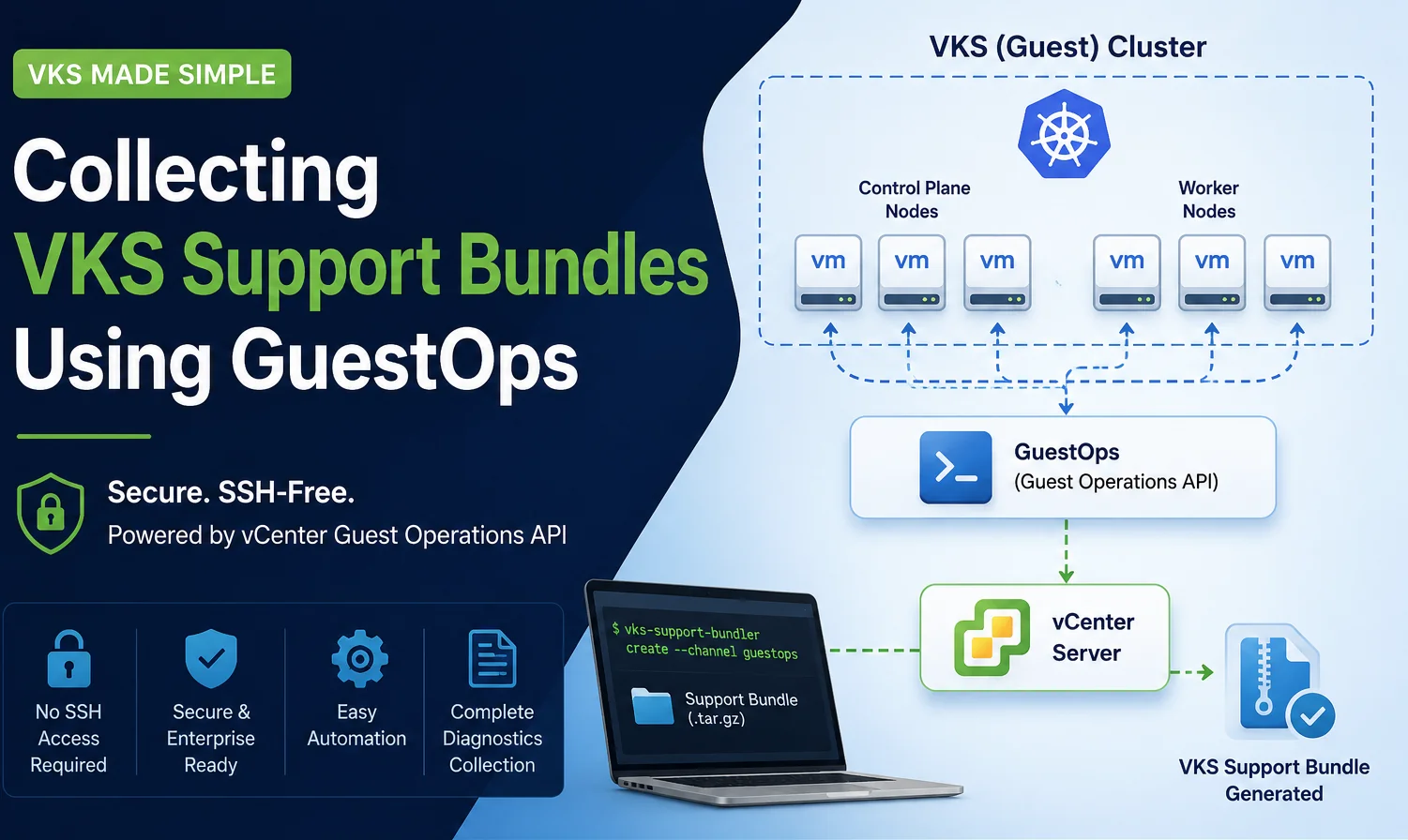
The GuestOps method provides a secure, scalable, and automation-friendly alternative by leveraging vCenter Guest Operations APIs to collect logs without direct node access.
This blog focuses entirely on collecting VKS support bundles using GuestOps.
Prerequisites
Before starting, ensure the following are in place.
- Linux Jump Host which has Supervisor Cluster Access
- Required Permissions (vSphere Administrator privileges, Access to Supervisor namespace and Permissions to execute Guest Operations)
- Download VKS Support Bundler Tool from Broadcom KB
Workflow Steps
- Login to Supervisor Cluster
- Run vks-support-bundler tool
- Tool communicates with vCenter
- GuestOps executes commands inside VKS nodes
- Logs are collected and packaged
- Bundle is saved locally
Bill of Materials(BOM) used in this Demo
- VCF 9.0.2 GA
- VKS 3.6.2
- VKS Support Bundler CLI Version:3.6.0
Step-by-Step Guide
Step 1 — Extract the Tool
# ls
vks-support-bundler-linux-amd64-3.6.0.tar.gz

# tar -xvf vks-support-bundler-linux-amd64-3.6.0.tar.gz
./
./vks-support-bundler
README.md

# ./vks-support-bundler version
VMware vSphere Kubernetes Servic Support Bundler CLI Version:3.6.0, Git Commit:bf89b11, Build Type:dev, Build Number:25211646
Step 2 — Login to Supervisor Cluster
kubectl vsphere login --server=<SUPERVISOR_IP> --vsphere-username <VC_SSO_USER> --insecure-skip-tls-verify
# kubectl vsphere login --server=192.168.100.100--vsphere-username administrator@vkr.local --insecure-skip-tls-verify


Password:
Logged in successfully.

You have access to the following contexts:
   192.168.100.100
   svc-cci-ns-domain-c11
   svc-tkg-domain-c11
   svc-velero-domain-c11
   demo-vks-namespace
Step 3 — Verify Context
# kubectl config current-context
192.168.100.100
Step 4 — Run VKS Cluster Support Bundle Collection
./vks-support-bundler create -k ~/.kube/config -v <VCENTER_IP> -u <VC_SSO_USER> -c <GUEST_CLUSTER_NAME> -n <SUPERVISOR_NAMESPACE> -o <Output_Directory> -i true
Command Parameter Explanation
-k = Path to kubeconfig
-v = vCenter IP/FQDN
-u = vCenter SSO username
-c = VKS cluster name
-n = Supervisor namespace
-o = Output directory
-i = Interactive password prompt
-p = Progress-bar
Please Refer to official Broadcom documentation for the latest guidance on all the supported parameters.
 # ./vks-support-bundler create -k ~/.kube/config -v 192.168.100.10 -u administrator@vks.local -c  demo-vks-namespace-cluster01 -n  demo-vks-namespace -o /tmp/demo/ -i true -p

Using kubeconfig authentication
✔ VCPassword: ********

INFO[2026-05-18T08:52:17-07:00] Start: cluster=demo-vks-namespace-cluster01, namespace=demo-vks-namespace, skipCreateUser=false
INFO[2026-05-18T08:52:17-07:00] Creating Kubernetes client using kubeconfig: /root/.kube/config
INFO[2026-05-18T08:52:17-07:00] Validating and fetching cluster info...
INFO[2026-05-18T08:52:17-07:00] Generate logs validating input kubeconfig...
I0518 08:52:17.492463  121374 warnings.go:110] "Warning: run.tanzu.vmware.com/tanzukubernetescluster is deprecated. It is succeeded by cluster.x-k8s.io/cluster. Refer to documentation."

<you will see bunch of console logs in between, please read the last line to retrieve the directory path of collected support bundle>

INFO[2026-05-18T08:54:51-07:00] Successfully created support-bundle at /tmp/demo/
From above output, we can see support-bundle is saved at /tmp/demo/.
# cd /tmp/demo
# ls
README.md
vks-support-bundler
vks-support-bundler-linux-amd64-3.6.0.tar.gz
demo-vks-namespace-cluster01-demo-vks-namespace-1779119537-support-bundle.tar.gz
demo-vks-namespace-cluster01-demo-vks-namespace-1779119537-support-bundle.log
demo-vks-namespace-cluster01-demo-vks-namespace-1779119537-support-bundle.tar.gz is your collected VKS Cluster support bundle.
Disclaimer
This blog is for informational and educational purposes only. The configurations, examples, and architectural guidance provided are based on general best practices and publicly available references.
Always validate configurations in a non-production environment before applying them to live systems. Features and integrations may vary depending on the versions of VKS, VKr, LCI, Supervisor and vCenter Server being used. The author is not responsible for any unintended impact caused by the use of this information in production environments.
Contents, and opinions are my own and do not reflect the opinions of my employer.